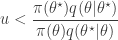
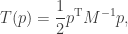
Introduction to Approximate Bayesian Computation (ABC)

31/03/2013

Many of the posts in this blog have been concerned with using MCMC based methods for Bayesian inference. These methods are typically “exact” in the sense that they have the exact posterior distribution of interest as their target equilibrium distribution, but are obviously “approximate”, in that for any finite amount of computing time, we can only generate a finite sample of correlated realisations from a Markov chain that we hope is close to equilibrium.

Approximate Bayesian Computation (ABC) methods go a step further, and generate samples from a distribution which is not the true posterior distribution of interest, but a distribution which is hoped to be close to the real posterior distribution of interest. There are many variants on ABC, and I won’t get around to explaining all of them in this blog. The wikipedia page on ABC is a good starting point for further reading. In this post I’ll explain the most basic rejection sampling version of ABC, and in a subsequent post, I’ll explain a sequential refinement, often referred to as ABC-SMC. As usual, I’ll use R code to illustrate the ideas.

Basic idea

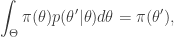
There is a close connection between “likelihood free” MCMC methods and those of approximate Bayesian computation (ABC). To keep things simple, consider the case of a perfectly observed system, so that there is no latent variable layer. Then there are model parameters \theta described by a prior \pi(\theta), and a forwards-simulation model for the data x, defined by \pi(x|\theta). It is clear that a simple algorithm for simulating from the desired posterior \pi(\theta|x) can be obtained as follows. First simulate from the joint distribution \pi(\theta,x) by simulating \theta^\star\sim\pi(\theta) and then x^\star\sim \pi(x|\theta^\star). This gives a sample (\theta^\star,x^\star) from the joint distribution. A simple rejection algorithm which rejects the proposed pair unless x^\star matches the true data x clearly gives a sample from the required posterior distribution.

Exact rejection sampling

  • 1. Sample \theta^\star \sim \pi(\theta^\star)
  • 2. Sample x^\star\sim \pi(x^\star|\theta^\star)
  • 3. If x^\star=x, keep \theta^\star as a sample from \pi(\theta|x), otherwise reject.
  • 4. Return to step 1.

This algorithm is exact, and for discrete x will have a non-zero acceptance rate. However, in most interesting problems the rejection rate will be intolerably high. In particular, the acceptance rate will typically be zero for continuous valued x.

ABC rejection sampling

The ABC “approximation” is to accept values provided that x^\star is “sufficiently close” to x. In the first instance, we can formulate this as follows.

  • 1. Sample \theta^\star \sim \pi(\theta^\star)
  • 2. Sample x^\star\sim \pi(x^\star|\theta^\star)
  • 3. If \Vert x^\star-x\Vert< \epsilon, keep \theta^\star as a sample from \pi(\theta|x), otherwise reject.
  • 4. Return to step 1.

Euclidean distance is usually chosen as the norm, though any norm can be used. This procedure is “honest”, in the sense that it produces exact realisations from

\theta^\star\big|\Vert x^\star-x\Vert < \epsilon.

For suitable small choice of \epsilon, this will closely approximate the true posterior. However, smaller choices of \epsilon will lead to higher rejection rates. This will be a particular problem in the context of high-dimensional x, where it is often unrealistic to expect a close match between all components of x and the simulated data x^\star, even for a good choice of \theta^\star. In this case, it makes more sense to look for good agreement between particular aspects of x, such as the mean, or variance, or auto-correlation, depending on the exact problem and context.

In the simplest case, this is done by forming a (vector of) summary statistic(s), s(x^\star) (ideally a sufficient statistic), and accepting provided that \Vert s(x^\star)-s(x)\Vert<\epsilon for some suitable choice of metric and \epsilon. We will return to this issue in a subsequent post.

Inference for an intractable Markov process

I’ll illustrate ABC in the context of parameter inference for a Markov process with an intractable transition kernel: the discrete stochastic Lotka-Volterra model. A function for simulating exact realisations from the intractable kernel is included in the smfsb CRAN package discussed in a previous post. Using pMCMC to solve the parameter inference problem is discussed in another post. It may be helpful to skim through those posts quickly to become familiar with this problem before proceeding.

So, for a given proposed set of parameters, realisations from the process can be sampled using the functions simTs and stepLV (from the smfsb package). We will use the sample data set LVperfect (from the LVdata dataset) as our “true”, or “target” data, and try to find parameters for the process which are consistent with this data. A fairly minimal R script for this problem is given below.

require(smfsb)
data(LVdata)

N=1e5
message(paste("N =",N))
prior=cbind(th1=exp(runif(N,-4,2)),th2=exp(runif(N,-4,2)),th3=exp(runif(N,-4,2)))
rows=lapply(1:N,function(i){prior[i,]})
message("starting simulation")
samples=lapply(rows,function(th){simTs(c(50,100),0,30,2,stepLVc,th)})
message("finished simulation")

distance<-function(ts)
{
  diff=ts-LVperfect
  sum(diff*diff)
}

message("computing distances")
dist=lapply(samples,distance)
message("distances computed")

dist=sapply(dist,c)
cutoff=quantile(dist,1000/N)
post=prior[dist<cutoff,]

op=par(mfrow=c(2,3))
apply(post,2,hist,30)
apply(log(post),2,hist,30)
par(op)

This script should take 5-10 minutes to run on a decent laptop, and will result in histograms of the posterior marginals for the components of \theta and \log(\theta). Note that I have deliberately adopted a functional programming style, making use of the lapply function for the most computationally intensive steps. The reason for this will soon become apparent. Note that rather than pre-specifying a cutoff \epsilon, I’ve instead picked a quantile of the distance distribution. This is common practice in scenarios where the distance is difficult to have good intuition about. In fact here I’ve gone a step further and chosen a quantile to give a final sample of size 1000. Obviously then in this case I could have just selected out the top 1000 directly, but I wanted to illustrate the quantile based approach.

One problem with the above script is that all proposed samples are stored in memory at once. This is problematic for problems involving large numbers of samples. However, it is convenient to do simulations in large batches, both for computation of quantiles, and also for efficient parallelisation. The script below illustrates how to implement a batch parallelisation strategy for this problem. Samples are generated in batches of size 10^4, and only the best fitting samples are stored before the next batch is processed. This strategy can be used to get a good sized sample based on a more stringent acceptance criterion at the cost of addition simulation time. Note that the parallelisation code will only work with recent versions of R, and works by replacing calls to lapply with the parallel version, mclapply. You should notice an appreciable speed-up on a multicore machine.

require(smfsb)
require(parallel)
options(mc.cores=4)
data(LVdata)

N=1e5
bs=1e4
batches=N/bs
message(paste("N =",N," | bs =",bs," | batches =",batches))

distance<-function(ts)
{
  diff=ts[,1]-LVprey
  sum(diff*diff)
}

post=NULL
for (i in 1:batches) {
  message(paste("batch",i,"of",batches))
  prior=cbind(th1=exp(runif(bs,-4,2)),th2=exp(runif(bs,-4,2)),th3=exp(runif(bs,-4,2)))
  rows=lapply(1:bs,function(i){prior[i,]})
  samples=mclapply(rows,function(th){simTs(c(50,100),0,30,2,stepLVc,th)})
  dist=mclapply(samples,distance)
  dist=sapply(dist,c)
  cutoff=quantile(dist,1000/N)
  post=rbind(post,prior[dist<cutoff,])
}
message(paste("Finished. Kept",dim(post)[1],"simulations"))

op=par(mfrow=c(2,3))
apply(post,2,hist,30)
apply(log(post),2,hist,30)
par(op)

Note that there is an additional approximation here, since the top 100 samples from each of 10 batches of simulations won’t correspond exactly to the top 1000 samples overall, but given all of the other approximations going on in ABC, this one is likely to be the least of your worries.

Now, if you compare the approximate posteriors obtained here with the “true” posteriors obtained in an earlier post using pMCMC, you will see that these posteriors are really quite poor. However, this isn’t a very fair comparison, since we’ve only done 10^5 simulations. Jacking N up to 10^7 gives the ABC posterior below.

ABC posterior from 10^7 samples

ABC posterior from 10^7 samples

This is a bit better, but really not great. There are two basic problems with the simplistic ABC strategy adopted here, one related to the dimensionality of the data and the other the dimensionality of the parameter space. The most basic problem that we have here is the dimensionality of the data. We have 16 bivariate observations, so we want our stochastic simulation to shoot at a point in 32-dimensional space. That’s a tough call. The standard way to address this problem is to reduce the dimension of the data by introducing a few carefully chosen summary statistics and then just attempting to hit those. I’ll illustrate this in a subsequent post. The other problem is that often the prior and posterior over the parameters are quite different, and this problem too is exacerbated as the dimension of the parameter space increases. The standard way to deal with this is to sequentially adapt from the prior through a sequence of ABC posteriors. I’ll examine this in a future post as well, once I’ve also posted an introduction to the use of sequential Monte Carlo (SMC) samplers for static problems.

Further reading

For further reading, I suggest browsing the reference list of the Wikipedia page for ABC. Also look through the list of software on that page. In particular, note that there is a CRAN package, abc, providing R support for ABC. There is a vignette for this package which should be sufficient to get started.

Getting started with Bayesian variable selection using JAGS and rjags

20/11/2012

Bayesian variable selection

In a previous post I gave a quick introduction to using the rjags R package to access the JAGS Bayesian inference from within R. In this post I want to give a quick guide to using rjags for Bayesian variable selection. I intend to use this post as a starting point for future posts on Bayesian model and variable selection using more sophisticated approaches.

I will use the simple example of multiple linear regression to illustrate the ideas, but it should be noted that I’m just using that as an example. It turns out that in the context of linear regression there are lots of algebraic and computational tricks which can be used to simplify the variable selection problem. The approach I give here is therefore rather inefficient for linear regression, but generalises to more complex (non-linear) problems where analytical and computational short-cuts can’t be used so easily.

Consider a linear regression problem with n observations and p covariates, which we can write in matrix form as

y = \alpha \boldmath{1} + X\beta + \varepsilon,

where X is an n\times p matrix. The idea of variable selection is that probably not all of the p covariates are useful for predicting y, and therefore it would be useful to identify the variables which are, and just use those. Clearly each combination of variables corresponds to a different model, and so the variable selection amounts to choosing among the 2^p possible models. For large values of p it won’t be practical to consider each possible model separately, and so the idea of Bayesian variable selection is to consider a model containing all of the possible model combinations as sub-models, and the variable selection problem as just another aspect of the model which must be estimated from data. I’m simplifying and glossing over lots of details here, but there is a very nice review paper by O’Hara and Sillanpaa (2009) which the reader is referred to for further details.

The simplest and most natural way to tackle the variable selection problem from a Bayesian perspective is to introduce an indicator random variable I_i for each covariate, and introduce these into the model in order to “zero out” inactive covariates. That is we write the ith regression coefficient \beta_i as \beta_i=I_i\beta^\star_i, so that \beta^\star_i is the regression coefficient when I_i=1, and “doesn’t matter” when I_i=0. There are various ways to choose the prior over I_i and \beta^\star_i, but the simplest and most natural choice is to make them independent. This approach was used in Kuo and Mallick (1998), and hence is referred to as the Kuo and Mallick approach in O’Hara and Sillanpaa.

Simulating some data

In order to see how things work, let’s first simulate some data from a regression model with geometrically decaying regression coefficients.

n=500
p=20
X=matrix(rnorm(n*p),ncol=p)
beta=2^(0:(1-p))
print(beta)
alpha=3
tau=2
eps=rnorm(n,0,1/sqrt(tau))
y=alpha+as.vector(X%*%beta + eps)

Let’s also fit the model by least squares.

mod=lm(y~X)
print(summary(mod))

This should give output something like the following.

Call:
lm(formula = y ~ X)

Residuals:
     Min       1Q   Median       3Q      Max 
-1.62390 -0.48917 -0.02355  0.45683  2.35448 

Coefficients:
              Estimate Std. Error t value Pr(>|t|)    
(Intercept)  3.0565406  0.0332104  92.036  < 2e-16 ***
X1           0.9676415  0.0322847  29.972  < 2e-16 ***
X2           0.4840052  0.0333444  14.515  < 2e-16 ***
X3           0.2680482  0.0320577   8.361  6.8e-16 ***
X4           0.1127954  0.0314472   3.587 0.000369 ***
X5           0.0781860  0.0334818   2.335 0.019946 *  
X6           0.0136591  0.0335817   0.407 0.684379    
X7           0.0035329  0.0321935   0.110 0.912662    
X8           0.0445844  0.0329189   1.354 0.176257    
X9           0.0269504  0.0318558   0.846 0.397968    
X10          0.0114942  0.0326022   0.353 0.724575    
X11         -0.0045308  0.0330039  -0.137 0.890868    
X12          0.0111247  0.0342482   0.325 0.745455    
X13         -0.0584796  0.0317723  -1.841 0.066301 .  
X14         -0.0005005  0.0343499  -0.015 0.988381    
X15         -0.0410424  0.0334723  -1.226 0.220742    
X16          0.0084832  0.0329650   0.257 0.797026    
X17          0.0346331  0.0327433   1.058 0.290718    
X18          0.0013258  0.0328920   0.040 0.967865    
X19         -0.0086980  0.0354804  -0.245 0.806446    
X20          0.0093156  0.0342376   0.272 0.785671    
---
Signif. codes:  0 ‘***’ 0.001 ‘**’ 0.01 ‘*’ 0.05 ‘.’ 0.1 ‘ ’ 1 

Residual standard error: 0.7251 on 479 degrees of freedom
Multiple R-squared: 0.7187,     Adjusted R-squared: 0.707 
F-statistic:  61.2 on 20 and 479 DF,  p-value: < 2.2e-16 

The first 4 variables are “highly significant” and the 5th is borderline.

Saturated model

We can fit the saturated model using JAGS with the following code.

require(rjags)
data=list(y=y,X=X,n=n,p=p)
init=list(tau=1,alpha=0,beta=rep(0,p))
modelstring="
  model {
    for (i in 1:n) {
      mean[i]<-alpha+inprod(X[i,],beta)
      y[i]~dnorm(mean[i],tau)
    }
    for (j in 1:p) {
      beta[j]~dnorm(0,0.001)
    }
    alpha~dnorm(0,0.0001)
    tau~dgamma(1,0.001)
  }
"
model=jags.model(textConnection(modelstring),
				data=data,inits=init)
update(model,n.iter=100)
output=coda.samples(model=model,variable.names=c("alpha","beta","tau"),
			n.iter=10000,thin=1)
print(summary(output))
plot(output)

I’ve hard-coded various hyper-parameters in the script which are vaguely reasonable for this kind of problem. I won’t include all of the output in this post, but this works fine and gives sensible results. However, it does not address the variable selection problem.

Basic variable selection

Let’s now modify the above script to do basic variable selection in the style of Kuo and Mallick.

data=list(y=y,X=X,n=n,p=p)
init=list(tau=1,alpha=0,betaT=rep(0,p),ind=rep(0,p))
modelstring="
  model {
    for (i in 1:n) {
      mean[i]<-alpha+inprod(X[i,],beta)
      y[i]~dnorm(mean[i],tau)
    }
    for (j in 1:p) {
      ind[j]~dbern(0.2)
      betaT[j]~dnorm(0,0.001)
      beta[j]<-ind[j]*betaT[j]
    }
    alpha~dnorm(0,0.0001)
    tau~dgamma(1,0.001)
  }
"
model=jags.model(textConnection(modelstring),
				data=data,inits=init)
update(model,n.iter=1000)
output=coda.samples(model=model,
		variable.names=c("alpha","beta","ind","tau"),
		n.iter=10000,thin=1)
print(summary(output))
plot(output)

Note that I’ve hard-coded an expectation that around 20% of variables should be included in the model. Again, I won’t include all of the output here, but the posterior mean of the indicator variables can be interpreted as posterior probabilities that the variables should be included in the model. Inspecting the output then reveals that the first three variables have a posterior probability of very close to one, the 4th variable has a small but non-negligible probability of inclusion, and the other variables all have very small probabilities of inclusion.

This is fine so far as it goes, but is not entirely satisfactory. One problem is that the choice of a “fixed effects” prior for the regression coefficients of the included variables is likely to lead to a Lindley’s paradox type situation, and a consequent under-selection of variables. It is arguably better to model the distribution of included variables using a “random effects” approach, leading to a more appropriate distribution for the included variables.

Variable selection with random effects

Adopting a random effects distribution for the included coefficients that is normal with mean zero and unknown variance helps to combat Lindley’s paradox, and can be implemented as follows.

data=list(y=y,X=X,n=n,p=p)
init=list(tau=1,taub=1,alpha=0,betaT=rep(0,p),ind=rep(0,p))
modelstring="
  model {
    for (i in 1:n) {
      mean[i]<-alpha+inprod(X[i,],beta)
      y[i]~dnorm(mean[i],tau)
    }
    for (j in 1:p) {
      ind[j]~dbern(0.2)
      betaT[j]~dnorm(0,taub)
      beta[j]<-ind[j]*betaT[j]
    }
    alpha~dnorm(0,0.0001)
    tau~dgamma(1,0.001)
    taub~dgamma(1,0.001)
  }
"
model=jags.model(textConnection(modelstring),
				data=data,inits=init)
update(model,n.iter=1000)
output=coda.samples(model=model,
		variable.names=c("alpha","beta","ind","tau","taub"),
		n.iter=10000,thin=1)
print(summary(output))
plot(output)

This leads to a large inclusion probability for the 4th variable, and non-negligible inclusion probabilities for the next few (it is obviously somewhat dependent on the simulated data set). This random effects variable selection modelling approach generally performs better, but it still has the potentially undesirable feature of hard-coding the probability of variable inclusion. Under the prior model, the number of variables included is binomial, and the binomial distribution is rather concentrated about its mean. Where there is a general desire to control the degree of sparsity in the model, this is a good thing, but if there is considerable uncertainty about the degree of sparsity that is anticipated, then a more flexible model may be desirable.

Variable selection with random effects and a prior on the inclusion probability

The previous model can be modified by introducing a Beta prior for the model inclusion probability. This induces a distribution for the number of included variables which has longer tails than the binomial distribution, allowing the model to learn about the degree of sparsity.

data=list(y=y,X=X,n=n,p=p)
init=list(tau=1,taub=1,pind=0.5,alpha=0,betaT=rep(0,p),ind=rep(0,p))
modelstring="
  model {
    for (i in 1:n) {
      mean[i]<-alpha+inprod(X[i,],beta)
      y[i]~dnorm(mean[i],tau)
    }
    for (j in 1:p) {
      ind[j]~dbern(pind)
      betaT[j]~dnorm(0,taub)
      beta[j]<-ind[j]*betaT[j]
    }
    alpha~dnorm(0,0.0001)
    tau~dgamma(1,0.001)
    taub~dgamma(1,0.001)
    pind~dbeta(2,8)
  }
"
model=jags.model(textConnection(modelstring),
				data=data,inits=init)
update(model,n.iter=1000)
output=coda.samples(model=model,
		variable.names=c("alpha","beta","ind","tau","taub","pind"),
		n.iter=10000,thin=1)
print(summary(output))
plot(output)

It turns out that for this particular problem the posterior distribution is not very different to the previous case, as for this problem the hard-coded choice of 20% is quite consistent with the data. However, the variable inclusion probabilities can be rather sensitive to the choice of hard-coded proportion.

Conclusion

Bayesian variable selection (and model selection more generally) is a very delicate topic, and there is much more to say about it. In this post I’ve concentrated on the practicalities of introducing variable selection into JAGS models. For further reading, I highly recommend the review of O’Hara and Sillanpaa (2009), which discusses other computational algorithms for variable selection. I intend to discuss some of the other methods in future posts.

References

O’Hara, R. and Sillanpaa, M. (2009) A review of Bayesian variable selection methods: what, how and which. Bayesian Analysis, 4(1):85-118. [DOI, PDF, Supp, BUGS Code]
Kuo, L. and Mallick, B. (1998) Variable selection for regression models. Sankhya B, 60(1):65-81.

Keeping R up to date on Ubuntu linux

10/11/2012

R is included as part of the standard Ubuntu distribution, and can be installed with a command like

sudo apt-get install r-base

Obviously the software included as part of the standard distribution usually lags a little behind the latest version, and this is usually quite acceptable for most users most of the time. However, R is evolving quite quickly at the moment, and for various reasons I have decided to skip Ubuntu 12.10 (quantal) and stick with Ubuntu 12.4 (precise) for the time being. Since R 2.14 is included with Ubuntu 12.4, and I’d rather use R 2.15, I’d like to run with the latest R builds on my Ubuntu system.

Fortunately this is very easy, as there is a maintained repository for Ubuntu builds of R on CRAN. Full instructions are provided on CRAN, but here is the quick summary. First you need to know your nearest CRAN mirror – there is a list of mirrors on CRAN. I generally use the Bristol mirror, and so I will use it in the following.

sudo su
echo "deb http://www.stats.bris.ac.uk/R/bin/linux/ubuntu precise/" >> /etc/apt/sources.list
apt-key adv --keyserver keyserver.ubuntu.com --recv-keys E084DAB9
apt-get update
apt-get upgrade

That’s it. You are updated to the latest version of R, and your system will check for updates in the usual way. There are just two things you may need to edit in line 2 above. The first is the address of the CRAN mirror (here “www.stats.bris.ac.uk”). The second is the name of the Ubuntu distro you are running (here “precise”).

Inlining JAGS models in R scripts for rjags

02/10/2012

JAGS (Just Another Gibbs Sampler) is a general purpose MCMC engine similar to WinBUGS and OpenBUGS. I have a slight preference for JAGS as it is free and portable, works well on Linux, and interfaces well with R. It is tempting to write a tutorial introduction to JAGS and the corresponding R package, rjags, but there is a lot of material freely available on-line already, so it isn’t really necessary. If you are new to JAGS, I suggest starting with Getting Started with JAGS, rjags, and Bayesian Modelling. In this post I want to focus specifically on the problem of inlining JAGS models in R scripts as it can be very useful, and is usually skipped in introductory material.

JAGS and rjags on Ubuntu Linux

On recent versions of Ubuntu, assuming that R is already installed, the simplest way to install JAGS and rjags is using the command

sudo apt-get install jags r-cran-rjags

Now rjags is a CRAN package, so it can be installed in the usual way with install.packages("rjags"). However, taking JAGS and rjags direct from the Ubuntu repos should help to ensure that the versions of JAGS and rjags are in sync, which is a good thing.

Toy model

For this post, I will use a trivial toy example of inference for the mean and precision of a normal random sample. That is, we will assume data

X_i \sim N(\mu,1/\tau),\quad i=1,2,\ldots n,

with priors on \mu and \tau of the form

\tau\sim Ga(a,b),\quad \mu \sim N(c,1/d).

Separate model file

The usual way to fit this model in R using rjags is to first create a separate file containing the model

  model {
    for (i in 1:n) {
      x[i]~dnorm(mu,tau)
    }
    mu~dnorm(cc,d)
    tau~dgamma(a,b)
  }

Then, supposing that this file is called jags1.jags, an R session to fit the model could be constructed as follows:

require(rjags)
x=rnorm(15,25,2)
data=list(x=x,n=length(x))
hyper=list(a=3,b=11,cc=10,d=1/100)
init=list(mu=0,tau=1)
model=jags.model("jags1.jags",data=append(data,hyper), inits=init)
update(model,n.iter=100)
output=coda.samples(model=model,variable.names=c("mu", "tau"), n.iter=10000, thin=1)
print(summary(output))
plot(output)

This is all fine, and it can be very useful to have the model declared in a separate file, especially if the model is large and complex, and you might want to use it from outside R. However, very often for simple models it can be quite inconvenient to have the model separate from the R script which runs it. In particular, people often have issues with naming files correctly, making sure R is looking in the correct directory, moving the model with the R script, etc. So it would be nice to be able to just inline the JAGS model within an R script, to keep the model, the data, and the analysis all together in one place.

Using a temporary file

What we want to do is declare the JAGS model within a text string inside an R script and then somehow pass this into the call to jags.model(). The obvious way to do this is to write the string to a text file, and then pass the name of that text file into jags.model(). This works fine, but some care needs to be taken to make sure this works in a generic platform independent way. For example, you need to write to a file that you know doesn’t exist in a directory that is writable using a filename that is valid on the OS on which the script is being run. For this purpose R has an excellent little function called tempfile() which solves exactly this naming problem. It should always return the name of a file which does not exist in a writable directly within the standard temporary file location on the OS on which R is being run. This function is exceedingly useful for all kinds of things, but doesn’t seem to be very well known by newcomers to R. Using this we can construct a stand-alone R script to fit the model as follows:

require(rjags)
x=rnorm(15,25,2)
data=list(x=x,n=length(x))
hyper=list(a=3,b=11,cc=10,d=1/100)
init=list(mu=0,tau=1)
modelstring="
  model {
    for (i in 1:n) {
      x[i]~dnorm(mu,tau)
    }
    mu~dnorm(cc,d)
    tau~dgamma(a,b)
  }
"
tmpf=tempfile()
tmps=file(tmpf,"w")
cat(modelstring,file=tmps)
close(tmps)
model=jags.model(tmpf,data=append(data,hyper), inits=init)
update(model,n.iter=100)
output=coda.samples(model=model,variable.names=c("mu", "tau"), n.iter=10000, thin=1)
print(summary(output))
plot(output)

Now, although there is a file containing the model temporarily involved, the script is stand-alone and portable.

Using a text connection

The solution above works fine, but still involves writing a file to disk and reading it back in again, which is a bit pointless in this case. We can solve this by using another under-appreciated R function, textConnection(). Many R functions which take a file as an argument will work fine if instead passed a textConnection object, and the rjags function jags.model() is no exception. Here, instead of writing the model string to disk, we can turn it into a textConnection object and then pass that directly into jags.model() without ever actually writing the model file to disk. This is faster, neater and cleaner. An R session which takes this approach is given below.

require(rjags)
x=rnorm(15,25,2)
data=list(x=x,n=length(x))
hyper=list(a=3,b=11,cc=10,d=1/100)
init=list(mu=0,tau=1)
modelstring="
  model {
    for (i in 1:n) {
      x[i]~dnorm(mu,tau)
    }
    mu~dnorm(cc,d)
    tau~dgamma(a,b)
  }
"
model=jags.model(textConnection(modelstring), data=append(data,hyper), inits=init)
update(model,n.iter=100)
output=coda.samples(model=model,variable.names=c("mu", "tau"), n.iter=10000, thin=1)
print(summary(output))
plot(output)

This is my preferred way to use rjags. Note again that textConnection objects have many and varied uses and applications that have nothing to do with rjags.

MCMC on the Raspberry Pi

07/07/2012

I’ve recently taken delivery of a Raspberry Pi mini computer. For anyone who doesn’t know, this is a low cost, low power machine, costing around 20 GBP (25 USD) and consuming around 2.5 Watts of power (it is powered by micro-USB). This amazing little device can run linux very adequately, and so naturally I’ve been interested to see if I can get MCMC codes to run on it, and to see how fast they run.

Now, I’m fairly sure that the majority of readers of this blog won’t want to be swamped with lots of Raspberry Pi related posts, so I’ve re-kindled my old personal blog for this purpose. Apart from this post, I’ll try not to write about my experiences with the Pi here on my main blog. Consequently, if you are interested in my ramblings about the Pi, you may wish to consider subscribing to my personal blog in addition to this one. Of course I’m not guaranteeing that the occasional Raspberry-flavoured post won’t find its way onto this blog, but I’ll try only to do so if it has strong relevance to statistical computing or one of the other core topics of this blog.

In order to get started with MCMC on the Pi, I’ve taken the C code gibbs.c for a simple Gibbs sampler described in a previous post (on this blog) and run it on a couple of laptops I have available, in addition to the Pi, and looked at timings. The full details of the experiment are recorded in this post over on my other blog, to which interested parties are referred. Here I will just give the “executive summary”.

The code runs fine on the Pi (running Raspbian), at around half the speed of my Intel Atom based netbook (running Ubuntu). My netbook in turn runs at around one fifth the speed of my Intel i7 based laptop. So the code runs at around one tenth of the speed of the fastest machine I have conveniently available.

As discussed over on my other blog, although the Pi is relatively slow, its low cost and low power consumption mean that is has a bang-for-buck comparable with high-end laptops and desktops. Further, a small cluster of Pis (known as a bramble) seems like a good, low cost way to learn about parallel and distributed statistical computing.

Metropolis Hastings MCMC when the proposal and target have differing support

04/06/2012

Introduction

Very often it is desirable to use Metropolis Hastings MCMC for a target distribution which does not have full support (for example, it may correspond to a non-negative random variable), using a proposal distribution which does (for example, a Gaussian random walk proposal). This isn’t a problem at all, but on more than one occasion now I have come across students getting this wrong, so I thought it might be useful to have a brief post on how to do it right, see what people sometimes get wrong, and why, and then think about correcting the wrong method in order to make it right…

A simple example

For this post we will consider a simple Ga(2,1) target distribution, with density

\pi(x) = xe^{-x},\quad x\geq 0.

Of course this is a very simple distribution, and there are many straightforward ways to simulate it directly, but for this post we will use a random walk Metropolis-Hastings (MH) scheme with standard Gaussian innovations. So, if the current state of the chain is x, a proposed new value x^\star will be generated from

f(x^\star|x) = \phi(x^\star-x),

where \phi(\cdot) is the standard normal density. This proposed new value is accepted with probability \min\{1,A\}, where

\displaystyle A = \frac{\pi(x^\star)}{\pi(x)} \frac{f(x|x^\star)}{f(x^\star|x)} = \frac{\pi(x^\star)}{\pi(x)} \frac{\phi(x-x^\star)}{\phi(x^\star-x)} = \frac{\pi(x^\star)}{\pi(x)} ,

since the standard normal density is symmetric.

Correct implementation

We can easily implement this using R as follows:

met1=function(iters)
  {
    xvec=numeric(iters)
    x=1
    for (i in 1:iters) {
      xs=x+rnorm(1)
      A=dgamma(xs,2,1)/dgamma(x,2,1)
      if (runif(1)<A)
        x=xs
      xvec[i]=x
    }
    return(xvec)
  }

We can run it, plot the results and check it against the true target with the following commands.

iters=1000000
out=met1(iters)
hist(out,100,freq=FALSE,main="met1")
curve(dgamma(x,2,1),add=TRUE,col=2,lwd=2)

If you have a slow computer, you may prefer to use iters=100000. The above code uses R’s built-in gamma density. Alternatively, we can hard-code the density as follows.

met2=function(iters)
  {
    xvec=numeric(iters)
    x=1
    for (i in 1:iters) {
      xs=x+rnorm(1)
      A=xs*exp(-xs)/(x*exp(-x))
      if (runif(1)<A)
        x=xs
      xvec[i]=x
    }
    return(xvec)
  }

We can run this code using the following commands, to verify that it does work as expected.

out=met2(iters)
hist(out,100,freq=FALSE,main="met2")
curve(dgamma(x,2,1),add=TRUE,col=2,lwd=2)

However, there is a potential problem with the above code that we have got away with in this instance, which often catches people out. We have hard-coded the density for x>0 without checking the sign of x. Here we get away with it as a negative proposal will lead to a negative acceptance ratio that we will reject straight away. This is not always the case (consider, for example, a Ga(3,1) distribution). So really we should check the sign of x^\star and reject immediately if is not within the support of the target.

Although this problem often catches people out, it tends not to be a big issue in practice, as it typically leads to an obviously incorrect sampler, or a sampler which crashes, and is relatively simple to debug and fix.

An incorrect sampler

The problem I want to focus on here is more subtle, but closely related. It is clear that any x^\star<0 should be rejected. With the above code, such values are indeed rejected, and the sampler advances to the next iteration. However, in more complex samplers, where an update like this might be one tiny part of a massive sampler with a very high-dimensional state space, it seems like a bit of a "waste" of a MH move to just propose a negative value, throw it away, and move on. Evidently, it seems tempting, therefore, to keep on sampling x^\star values until a non-negative value is obtained, and then evaluate the acceptance ratio and decide whether or not to accept. We could code up this sampler as follows.

met3=function(iters)
  {
    xvec=numeric(iters)
    x=1
    for (i in 1:iters) {
      repeat {
        xs=x+rnorm(1)
        if (xs>0)
          break
      }
      A=xs*exp(-xs)/(x*exp(-x))
      if (runif(1)<A)
        x=xs
      xvec[i]=x
    }
    return(xvec)
  }

As reasonable as this idea may at first seem, it does not lead to a sampler having the desired target, as can be verified using the following commands.

out=met3(iters)
hist(out,100,freq=FALSE,main="met3")
curve(dgamma(x,2,1),add=TRUE,col=2,lwd=2)

So, this sampler seems to be sampling something close to the desired target, but not the same. This raises a couple of questions. First and most important, can we fix this sampler so that it does sample the correct target (yes), and second, can we figure out what target density the incorrect sampler is actually sampling (again, yes)? Let’s start with the issue of how to fix the sampler, as this will also help us to understand what the incorrect sampler is doing.

Fixing the truncated sampler

By repeatedly sampling from the proposal until we obtain a non-negative value, we are actually implementing a rejection sampler for sampling from the proposal distribution truncated at zero. This is a perfectly reasonable proposal distribution, so we can use it provided that we use the correct MH acceptance ratio. Now, the truncated density has the same density as the untruncated density, apart from the differing support and a normalising constant. Indeed, this may be why people often assume this method will work, because normalising constants often don’t matter in MH schemes. However, the normalising constant only doesn’t matter if it is independent of the state, and here it is not… Explicitly, we have

f(x^\star|x) \propto \phi(x^\star-x),\quad x^\star>0.

Including the normalising constant we have

\displaystyle f(x^\star|x) = \frac{\phi(x^\star-x)}{\Phi(x)},\quad x^\star>0,

where \Phi(x) is the standard normal CDF. Consequently, the correct acceptance ratio to use with this proposal is

\displaystyle A = \frac{\pi(x^\star)}{\pi(x)} \frac{\phi(x-x^\star)}{\phi(x^\star-x)}\frac{\Phi(x)}{\Phi(x^\star)} =   \frac{\pi(x^\star)}{\pi(x)}\frac{\Phi(x)}{\Phi(x^\star)},

where we see that the normalising constants do not cancel out. We can modify the previous sampler to use the correct acceptance ratio as follows.

met4=function(iters)
  {
    xvec=numeric(iters)
    x=1
    for (i in 1:iters) {
      repeat {
        xs=x+rnorm(1)
        if (xs>0)
          break
      }
      A=xs*exp(-xs)/(x*exp(-x))
      A=A*pnorm(x)/pnorm(xs)
      if (runif(1)<A)
        x=xs
      xvec[i]=x
    }
    return(xvec)
  }

We can verify that this sampler gives leads to the correct target with the following commands.

out=met4(iters)
hist(out,100,freq=FALSE,main="met4")
curve(dgamma(x,2,1),add=TRUE,col=2,lwd=2)

So, truncating the proposal at zero is fine, provided that you modify the acceptance ratio accordingly.

What does the incorrect sampler target?

Now that we understand why the naive truncated sampler was wrong and how to fix it, we can, out of curiosity, wonder what distribution that sampler actually targets. Now we understand what proposal we are actually using, we can re-write the acceptance ratio as

\displaystyle A = \frac{\pi(x^\star)\Phi(x^\star)}{\pi(x)\Phi(x)}\frac{\frac{\phi(x-x^\star)}{\Phi(x^\star)}}{\frac{\phi(x^\star-x)}{\Phi(x)}},

from which it is clear that the actual target of this chain is

\tilde\pi(x) \propto \pi(x)\Phi(x),

or

\tilde\pi(x)\propto xe^{-x}\Phi(x),\quad x\geq 0.

The constant of proportionality is not immediately obvious, but is tractable, and turns out to be a nice undergraduate exercise in integration by parts, leading to

\displaystyle \tilde\pi(x) = \frac{2\sqrt{2\pi}}{2+\sqrt{2\pi}}xe^{-x}\Phi(x),\quad x\geq 0.

We can verify this using the following commands.

out=met3(iters)
hist(out,100,freq=FALSE,main="met3")
curve(dgamma(x,2,1)*pnorm(x)*2*sqrt(2*pi)/(sqrt(2*pi)+2),add=TRUE,col=3,lwd=2)

Now we know the actual target of the incorrect sampler, we can compare it with the correct target as follows.

curve(dgamma(x,2,1),0,10,col=2,lwd=2,main="Densities")
curve(dgamma(x,2,1)*pnorm(x)*2*sqrt(2*pi)/(sqrt(2*pi)+2),add=TRUE,col=3,lwd=2)

So we see that the distributions are different, but not so different that one would immediate suspect an error on the basis of a sample of output. This makes it a difficult bug to track down.

Summary

There is no problem in principle using a proposal with full support for a target with limited support in MH algorithms. However, it is important to check whether a proposed value is within the support of the target and reject the proposed move if it is not. If you are concerned that such a scheme might be inefficient, it is possible to use a truncated proposal provided that you modify the MH acceptance ratio to include the relevant normalisation constants. If you don’t modify the acceptance probability, you will get a sampler which targets the wrong distribution, but it will often be quite similar to the correct target, making it a difficult bug to spot and track down.

Gibbs sampling a Gaussian Markov random field (GMRF) using Java

01/06/2012

Introduction

As I’ve explained previously, I’m gradually coming around to the idea of using Java for the development of MCMC codes, and I’m starting to build up a collection of simple examples for getting started. One of the advantages of Java is that it includes a standard cross-platform GUI library. This might not seem like the most important requirement for MCMC, but can actually be very handy in several contexts, particularly for monitoring convergence. One obvious context is that of image analysis, where it can be useful to monitor image reconstructions as the sampler is running. In this post I’ll show three very small simple Java classes which together provide an application for running a Gibbs sampler on a (non-stationary, unconditioned) Gaussian Markov random field.

The model is essentially that the distribution of each pixel is defined intrinsically, dependent only on its four nearest neighbours on a rectangular lattice, and here the distribution will be Gaussian with mean equal to the sample mean of the four neighbouring pixels and a fixed (unit) variance. On its own this isn’t especially useful, but it is a key component of many image analysis applications.

A simple Java implementation

We will start with the class MrfApp containing the main method for the application:

MrfApp.java

import java.io.*;
class MrfApp {
    public static void main(String[] arg)
	throws IOException
    {
	Mrf mrf;
	System.out.println("started program");
	mrf=new Mrf(800,600);
	System.out.println("created mrf object");
	mrf.update(1000);
	System.out.println("done updates");
	mrf.saveImage("mrf.png");
	System.out.println("finished program");
	mrf.frame.dispose();
	System.exit(0);
    }
}

Hopefully this code is largely self-explanatory, but relies on a class called Mrf which contains all of the logic associated with the GMRF.

Mrf.java

import java.io.*;
import java.util.*;
import java.awt.image.*;
import javax.swing.*;
import javax.imageio.ImageIO;


class Mrf 
{
    int n,m;
    double[][] cells;
    Random rng;
    BufferedImage bi;
    WritableRaster wr;
    JFrame frame;
    ImagePanel ip;
    
    Mrf(int n_arg,int m_arg)
    {
	n=n_arg;
	m=m_arg;
	cells=new double[n][m];
	rng=new Random();
	bi=new BufferedImage(n,m,BufferedImage.TYPE_BYTE_GRAY);
	wr=bi.getRaster();
	frame=new JFrame("MRF");
	frame.setSize(n,m);
	frame.add(new ImagePanel(bi));
	frame.setVisible(true);
    }
    
    public void saveImage(String filename)
	throws IOException
    {
	ImageIO.write(bi,"PNG",new File(filename));
    }
    
    public void updateImage()
    {
	double mx=-1e+100;
	double mn=1e+100;
	for (int i=0;i<n;i++) {
	    for (int j=0;j<m;j++) {
		if (cells[i][j]>mx) { mx=cells[i][j]; }
		if (cells[i][j]<mn) { mn=cells[i][j]; }
	    }
	}
	for (int i=0;i<n;i++) {
	    for (int j=0;j<m;j++) {
		int level=(int) (255*(cells[i][j]-mn)/(mx-mn));
		wr.setSample(i,j,0,level);
	    }
	}
	frame.repaint();
    }
    
    public void update(int num)
    {
	for (int i=0;i<num;i++) {
	    updateOnce();
	}
    }
    
    private void updateOnce()
    {
	double mean;
	for (int i=0;i<n;i++) {
	    for (int j=0;j<m;j++) {
		if (i==0) {
		    if (j==0) {
			mean=0.5*(cells[0][1]+cells[1][0]);
		    } 
		    else if (j==m-1) {
			mean=0.5*(cells[0][j-1]+cells[1][j]);
		    } 
		    else {
			mean=(cells[0][j-1]+cells[0][j+1]+cells[1][j])/3.0;
		    }
		}
		else if (i==n-1) {
		    if (j==0) {
			mean=0.5*(cells[i][1]+cells[i-1][0]);
		    }
		    else if (j==m-1) {
			mean=0.5*(cells[i][j-1]+cells[i-1][j]);
		    }
		    else {
			mean=(cells[i][j-1]+cells[i][j+1]+cells[i-1][j])/3.0;
		    }
		}
		else if (j==0) {
		    mean=(cells[i-1][0]+cells[i+1][0]+cells[i][1])/3.0;
		}
		else if (j==m-1) {
		    mean=(cells[i-1][j]+cells[i+1][j]+cells[i][j-1])/3.0;
		}
		else {
		    mean=0.25*(cells[i][j-1]+cells[i][j+1]+cells[i+1][j]
			       +cells[i-1][j]);
		}
		cells[i][j]=mean+rng.nextGaussian();
	    }
	}
	updateImage();
    }
    
}

This class contains a few simple methods for creating and updating the GMRF, and also for maintaining and updating a graphical view of the GMRF as the sampler is running. The Gibbs sampler update itself is encoded in the final method, updateOnce, and most of the code is to deal with edge and corner cases (in the literal rather than metaphorical sense!). This is called repeatedly by the method update for the required number of iterations. At the end of each iteration, the method updateOnce triggers updateImage which updates the image associated GMRF. The GMRF itself is stored in a 2-dimensional array of doubles, but an image pixel typically consists of a grayscale value represented by an unsigned byte – that is, an integer from 0 to 255. So updateImage scans through the GMRF to find the maximum and minimum values and then maps the GMRF values onto the 0 to 255 scale. The image itself is set up by the constructor method, Mrf. This class relies on an additional class called ImagePanel, which is a simple GUI panel for displaying images:

ImagePanel.java

import java.awt.*;
import java.awt.image.*;
import javax.swing.*;

class ImagePanel extends JPanel {

	protected BufferedImage image;

	public ImagePanel(BufferedImage image) {
		this.image=image;
		Dimension dim=new Dimension(image.getWidth(),image.getHeight());
		setPreferredSize(dim);
		setMinimumSize(dim);
		revalidate();
		repaint();
	}

	public void paintComponent(Graphics g) {
		g.drawImage(image,0,0,this);
	}

}

This completes the application, which can be compiled and run from the command line with

javac *.java
java MrfApp

This should compile the code and run the application, which will show a GMRF updating for 1000 iterations. When the 1000 iterations are complete, the application writes the final image to a file and then quits.

Using Parallel COLT

The above classes are very convenient, as they should work with any standard Java installation. However, in more complex scenarios, it is likely that a math library such as Parallel COLT will be required. In this case it will make sense to make use of features in the COLT library, such as random number generators and 2d matrix objects. We can adapt the above application by replacing the MrfApp and Mrf classes with the following versions (the ImagePanel class remains unchanged):

MrfApp.java

import java.io.*;
import cern.jet.random.tdouble.engine.*;

class MrfApp {

    public static void main(String[] arg)
	throws IOException
    {
	Mrf mrf;
	int seed=1234;
	System.out.println("started program");
        DoubleRandomEngine rngEngine=new DoubleMersenneTwister(seed);
	mrf=new Mrf(800,600,rngEngine);
	System.out.println("created mrf object");
	mrf.update(1000);
	System.out.println("done updates");
	mrf.saveImage("mrf.png");
	System.out.println("finished program");
	mrf.frame.dispose();
	System.exit(0);
    }

}

Mrf.java

import java.io.*;
import java.util.*;
import java.awt.image.*;
import javax.swing.*;
import javax.imageio.ImageIO;
import cern.jet.random.tdouble.*;
import cern.jet.random.tdouble.engine.*;
import cern.colt.matrix.tdouble.impl.*;

class Mrf 
{
    int n,m;
    DenseDoubleMatrix2D cells;
    DoubleRandomEngine rng;
    Normal rngN;
    BufferedImage bi;
    WritableRaster wr;
    JFrame frame;
    ImagePanel ip;
    
    Mrf(int n_arg,int m_arg,DoubleRandomEngine rng)
    {
	n=n_arg;
	m=m_arg;
	cells=new DenseDoubleMatrix2D(n,m);
	this.rng=rng;
	rngN=new Normal(0.0,1.0,rng);
	bi=new BufferedImage(n,m,BufferedImage.TYPE_BYTE_GRAY);
	wr=bi.getRaster();
	frame=new JFrame("MRF");
	frame.setSize(n,m);
	frame.add(new ImagePanel(bi));
	frame.setVisible(true);
    }
    
    public void saveImage(String filename)
	throws IOException
    {
	ImageIO.write(bi,"PNG",new File(filename));
    }
    
    public void updateImage()
    {
	double mx=-1e+100;
	double mn=1e+100;
	for (int i=0;i<n;i++) {
	    for (int j=0;j<m;j++) {
		if (cells.getQuick(i,j)>mx) { mx=cells.getQuick(i,j); }
		if (cells.getQuick(i,j)<mn) { mn=cells.getQuick(i,j); }
	    }
	}
	for (int i=0;i<n;i++) {
	    for (int j=0;j<m;j++) {
		int level=(int) (255*(cells.getQuick(i,j)-mn)/(mx-mn));
		wr.setSample(i,j,0,level);
	    }
	}
	frame.repaint();
    }
    
    public void update(int num)
    {
	for (int i=0;i<num;i++) {
	    updateOnce();
	}
    }
    
    private void updateOnce()
    {
	double mean;
	for (int i=0;i<n;i++) {
	    for (int j=0;j<m;j++) {
		if (i==0) {
		    if (j==0) {
			mean=0.5*(cells.getQuick(0,1)+cells.getQuick(1,0));
		    } 
		    else if (j==m-1) {
			mean=0.5*(cells.getQuick(0,j-1)+cells.getQuick(1,j));
		    } 
		    else {
			mean=(cells.getQuick(0,j-1)+cells.getQuick(0,j+1)+cells.getQuick(1,j))/3.0;
		    }
		}
		else if (i==n-1) {
		    if (j==0) {
			mean=0.5*(cells.getQuick(i,1)+cells.getQuick(i-1,0));
		    }
		    else if (j==m-1) {
			mean=0.5*(cells.getQuick(i,j-1)+cells.getQuick(i-1,j));
		    }
		    else {
			mean=(cells.getQuick(i,j-1)+cells.getQuick(i,j+1)+cells.getQuick(i-1,j))/3.0;
		    }
		}
		else if (j==0) {
		    mean=(cells.getQuick(i-1,0)+cells.getQuick(i+1,0)+cells.getQuick(i,1))/3.0;
		}
		else if (j==m-1) {
		    mean=(cells.getQuick(i-1,j)+cells.getQuick(i+1,j)+cells.getQuick(i,j-1))/3.0;
		}
		else {
		    mean=0.25*(cells.getQuick(i,j-1)+cells.getQuick(i,j+1)+cells.getQuick(i+1,j)
			       +cells.getQuick(i-1,j));
		}
		cells.setQuick(i,j,mean+rngN.nextDouble());
	    }
	}
	updateImage();
    }
    
}

Again, the code should be reasonably self explanatory, and will compile and run in the same way provided that Parallel COLT is installed and in your classpath. This version runs approximately twice as fast as the previous version on all of the machines I’ve tried it on.

Reference

I have found the following book very useful for understanding how to work with images in Java:

Hunt, K.A. (2010) The Art of Image Processing with Java, A K Peters/CRC Press.

Multivariate data analysis (using R)

29/05/2012

I’ve been very quiet on-line in the last few months, due mainly to the fact that I’ve been writing a new undergraduate course on multivariate data analysis. Although there are many books and on-line notes on the general topic of multivariate statistics, I wanted to do something a little bit different from any text I have yet discovered. First, I wanted to have a strong emphasis on using techniques in practice on example data sets of reasonable size. For this, I found Hastie et al (2009) to be very useful, as it covered some interesting example data sets which have been bundled in the CRAN R package, ElemStatLearn. I used several of the data sets from this package as running examples throughout the course. In fact my initial plan was to use Hastie et al as the main course text, but it turned out that this text was in some places overly technical and in many places far too terse to be good as an undergraduate text. I would still recommend the book for researchers who want a good overview of the interface between statistics and machine learning, but with hindsight I’m not convinced it is ideal for typical statistics undergraduate students.

I also wanted to have a strong emphasis on numerical linear algebra as the basis for multivariate statistical computation. Again, this is a bit different from “old school” multivariate statistics (which reminds me, John Marden has produced a great text available freely on-line on old school multivariate analysis, which isn’t quite as “old school” as the title might suggest). I wanted to spend some time talking about linear systems and matrix factorisations, explaining, for example how the LU decomposition, the Cholesky factorisation and the QR factorisations are related, and why the latter two are both fundamental to multivariate data analysis, and how the singular value decomposition (SVD) is related to the spectral decomposition, and why it is generally better to construct principal components from the SVD of the centred data matrix than the eigen-decomposition of the sample variance matrix, etc. These sorts of topics are not often covered in undergraduate statistics courses, but they are crucial to understanding how to analyse large multivariate data sets in a numerically stable way.

I also wanted to downplay distribution theory as much as possible, as multivariate distribution theory is quite difficult, and not necessary for understanding most of the essential concepts in multivariate data analysis. Also, it is not obviously very useful. Essentially all introductory courses are based around the multivariate normal distribution, but I have yet to see a real non-trivial multivariate data set for which an assumption of multivariate normality is appropriate. Consequently I delayed the introduction of the multivariate normal until well into the course, and didn’t bother with the Wishart distribution, or testing for multivariate normality. Like much frequentist testing, it is really just a matter of seeing if you have yet collected a large enough sample to reject the null hypothesis – I just don’t see the point (null)!

Finally, I wanted to use R to illustrate all of the methods in practice as they were introduced. We use R throughout our undergraduate statistics programme, and I think it is a good language for learning about statistical methods, algorithms and concepts. In most cases I begin by showing how to carry out analyses using “elementary” operations (such as matrix manipulations), and then go on to show how to accomplish the same task more simply using higher-level R functions and packages. Again, I think it really helps understanding to first see the mathematical description directly translated into computer code before jumping to high-level data analysis functions.

There are several aspects of the course that I would like to distil out into self-contained blog posts, but I have a busy summer schedule, and a couple of other things I want to write about before I’ll have a chance to get around to it, so in the mean time, anyone interested is welcome to download a copy of the course notes (PDF, with hyperlinks). This is the student version, containing gaps, but the gaps mainly correspond to bits of standard theory and examples designed to be worked through by hand. All of the essential theory and context and all of the R examples are present in this version of the notes. There are seven chapters: Introduction to multivariate data; PCA and matrix factorisations; Inference, the MVN and multivariate regression; Cluster analysis and unsupervised learning; Discrimination and classification; Graphical modelling; Variable selection and multiple testing.

Catalogue of my first 25 blog posts

30/12/2011

This is my 25th blog post, so this seems like a good time to provide an index to those first 25 posts for ease of reference. I’ve covered a range of topics over my first two years of blogging, and managed to average almost one post per month, as suggested in my first post. Due to the rather occasional nature of my posting, most regular readers subscribe to my RSS feed using some kind of RSS feed reader. I use Google Reader for following blogs and other RSS feeds, which I find very convenient as it is web based and therefore synced across all the machines and devices I use, but there are plenty of other options. Alternatively, you can follow me on twitter, where I am @darrenjw, or my Google+ feed, as I always announce new posts on those platforms.

Blog posts

  • 1. About this blog…: quick introduction to the new blog and what to expect.
  • 2. Hypercubes in R (getting started with programming in R): Constructing, rotating and plotting (2d projections of) hypercubes in order to illustrate some elementary R programming concepts.
  • 3. Systems biology, mathematical modelling and mountains: My review of an excellent workshop I participated in at BIRS on Multi-scale Stochastic Modeling of Cell Dynamics.
  • 4. (Yet another) introduction to R and Bioconductor: A very quick tutorial on basic R concepts and getting started with Bioconductor – very first steps.
  • 5. MCMC programming in R, Python, Java and C: this post showed how to implement a very simple bivariate Gibbs sampler in four different programming languages, and compared the speeds. The post has now been superseded by post number 18.
  • 6. The last Valencia meeting on Bayesian Statistics and the future of Bayesian computation: My impressions of Bayes 9, together with some thoughts on Bayesian computing in the context of multicore CPUs, GPUs, clusters and “Big Data”.
  • 7. Metropolis-Hastings MCMC algorithms: A quick introduction to the Metropolis algorithm, with example code in R, discussing implementation issues.
  • 8. The pseudo-marginal approach to “exact approximate” MCMC algorithms: a simple explanation of the “pseudo-marginal” idea, which has many potential applications in Bayesian inference.
  • 9. Introduction to the processing of short read next generation sequencing data: a quick introduction to high-throughput sequencing data, the FASTQ file format, and the use of Unix and command-line tools for initial processing and analysis of FASTQ files.
  • 10. A quick introduction to the Bioconductor ShortRead package for the analysis of NGS data: a follow-on from post 9. where I show how to get started with the analysis of FASTQ sequencing data using R and Bioconductor.
  • 11. Getting started with parallel MCMC: an introduction to parallel Monte Carlo algorithms and their implementation using C, the GSL, and MPI.
  • 12. Calling C code from R: how to call a Gibbs sampler written in C from R.
  • 13. Calling Java code from R: how to call a Gibbs sampler written in Java from R.
  • 14. Parallel Monte Carlo with an Intel i7 Quad Core: a quick look at the potential speed-ups possible exploiting parallelisation on a laptop with a nice Quad-core CPU.
  • 15. MCMC, Monte Carlo likelihood estimation, and the bootstrap particle filter: how the pseudo-marginal idea discussed in post number 8. can be exploited for state-space models by using a simple particle filter to construct an unbiased estimate of marginal likelihood.
  • 16. The particle marginal Metropolis-Hastings (PMMH) particle MCMC algorithm: following on from the previous post, an explanation of the full PMMH pMCMC algorithm for simultaneous estimation of parameters and state for state-space models.
  • 17. Java math libraries and Monte Carlo simulation codes: a post bemoaning the lack of anything quite like the GSL C library in Java, but highlighting some reasonable alternatives (COLT, Parallel COLT and Apache Commons Math).
  • 18. Gibbs sampler in various languages (revisited): an updated version of post number 5, including detailed timings. I also take the opportunity to include new languages PyPy, Groovy and Scala.
  • 19. Faster Gibbs sampling MCMC from within R: How to call MCMC code written in C, C++ and Java from R, with timing details.
  • 20. Stochastic Modelling for Systems Biology, second edition: A quick introduction to the 2nd edition of my book, together with a tutorial introduction to the associated CRAN R package, smfsb, for simulation and inference of stochastic kinetic network models and other Markov processes.
  • 21. Particle filtering and pMCMC using R: code for particle filtering and particle MCMC for Markov processes, in R.
  • 22. Review of “Parallel R” by McCallum and Weston: my somewhat critical review of this book.
  • 23. Lexical scope and function closures in R: an introduction to notions of variable scope and closure in the context of R.
  • 24. Parallel particle filtering and pMCMC using R and multicore: a discussion of the parallelisation of the particle filtering code from post 21. using R’s high-level parallelisation constructs.
  • 25. Catalogue of my first 25 blog posts: this post!
  • Should I ever manage another 25 posts, I’ll do a similar review of the next 25 at post number 50…

    Parallel particle filtering and pMCMC using R and multicore

    29/12/2011

    Introduction

    In a previous post I showed how to construct a PMMH pMCMC algorithm for parameter estimation with partially observed Markov processes. The inner loop of a pMCMC algorithm consists of running a particle filter to construct an unbiased estimate of marginal likelihood. This inner loop is the place where the code spends almost all of its time, and so speeding up the particle filter will result in dramatic speedup of the pMCMC algorithm. This is fortunate, since as previously discussed, MCMC algorithms are difficult to parallelise other than on a per iteration basis. Here, each iteration can be speeded up if we can effectively parallelise a particle filter. Particle filters are much easier to parallelise than MCMC algorithms, and so it is tempting to try and exploit this within R. In fact, although it is the case that it is possible to effectively parallelise particle filters in efficient languages using low-level parallelisation tools (say, using C with MPI, or Java concurrency tools), it is not so easy to speed up R-based particle filters using R’s high-level parallelisation constructs, as we shall see.

    Particle filters

    In the previous post we looked at the function pfMLLik within the CRAN package smfsb. As a reminder, the source code is

    pfMLLik <- function (n, simx0, t0, stepFun, dataLik, data) 
    {
        times = c(t0, as.numeric(rownames(data)))
        deltas = diff(times)
        return(function(...) {
            xmat = simx0(n, t0, ...)
            ll = 0
            for (i in 1:length(deltas)) {
                xmat = t(apply(xmat, 1, stepFun, t0 = times[i], deltat = deltas[i], ...))
                w = apply(xmat, 1, dataLik, t = times[i + 1], y = data[i,], log = FALSE, ...)
                if (max(w) < 1e-20) {
                    warning("Particle filter bombed")
                    return(-1e+99)
                }
                ll = ll + log(mean(w))
                rows = sample(1:n, n, replace = TRUE, prob = w)
                xmat = xmat[rows, ]
            }
            ll
        })
    }
    

    The function itself doesn’t actually run a particle filter, but instead returns a function closure which does (see the previous post for a discussion of lexical scope and function closures in R). There are obviously several different steps within the particle filter, and several of these are amenable to parallelisation. However, for complex models, forward simulation from the model will be the rate-limiting step, where the vast majority of CPU cycles will be spent. Line 9 in the above code is where forward simulation takes place, and in particular, the key function call is the apply call:

    apply(xmat, 1, stepFun, t0 = times[i], deltat = deltas[i], ...)
    

    This call applies the forward simulation algorithm stepFun to each row of the matrix xmat independently. Since there are no dependencies between the function calls, this is in principle very straightforward to parallelise on multicore hardware.

    Multicore support in R

    I’m writing this post on a laptop with an Intel i7 quad core chip, running the 64 bit version of Ubuntu 11.10. R has support for multicore processing on this platform – it is just a simple matter of installing the relevant packages. However, things are changing rapidly regarding multicore support in R right now, so YMMV. Ubuntu 11.10 has R 2.13 by default, but the multicore support is slightly different in the recently released R 2.14. I’m still using R 2.13. I may update this post (or comment) when I move to R 2.14. The main difference is that the package multicore has been replaced by the package parallel. There are a few other minor changes, but it should be easy to adapt what is presented here to 2.14.

    There is a new O’Reilly book called Parallel R. I’ve got a copy of it. It does cover the new parallel package in R 2.14, as well as other parallel R topics, but the book is a bit light weight, to say the least, and I reviewed it on this blog. Please read my review for further details before you buy it.

    If you haven’t used multicore in R previously, then

    install.packages(c("multicore","doMC"))
    

    should get you started (again, I’m assuming that your R version is strictly < 2.14). You can test it has worked with:

    library(multicore)
    multicore:::detectCores()
    

    When I do this, I get the answer 8 (I have 4 cores, each of which is hyper-threaded). To begin with, I want to tell R to use just 4 process threads, and I can do this with

    library(doMC)
    registerDoMC(4)
    

    Replacing the second line with registerDoMC() will set things up to use all detected cores (in my case, 8). There are a couple of different strategies we could use to parallelise this. One strategy for parallelising the apply call discussed above is to be to replace it with a foreach / %dopar% loop. This is best illustrated by example. Start with line 9 from the function pfMLLik:

    xmat = t(apply(xmat, 1, stepFun, t0 = times[i], deltat = deltas[i], ...))
    

    We can produce a parallelised version by replacing this line with the following block of code:

    res=foreach(j=1:dim(xmat)[1]) %dopar% {
      stepFun(xmat[j,], t0 = times[i], deltat = deltas[i], ...)
    }
    xmat=t(sapply(res,cbind))
    

    Each iteration of the foreach loop is executed independently (possibly using multiple cores), and the result of each iteration is returned as a list, and captured in res. This list of return vectors is then coerced back into a matrix with the final line.

    In fact, we can improve on this by using the .combine argument to foreach, which describes how to combine the results from each iteration. Here we can just use rbind to combine the results into a matrix, using:

    xmat=foreach(j=1:dim(xmat)[1], .combine="rbind") %dopar% {
      stepFun(xmat[j,], t0 = times[i], deltat = deltas[i], ...)
    }
    

    This code is much neater, and in principle ought to be a bit faster, though I haven’t noticed much difference in practice.

    In fact, it is not necessary to use the foreach construct at all. The multicore package provides the mclapply function, which is a multicore version of lapply. To use mclapply (or, indeed, lapply) here, we first need to split our matrix into a list of rows, which we can do using the split command. So in fact, our apply call can be replaced with the single line:

    xmat=t(sapply(mclapply(split(xmat,row(xmat)), stepFun, t0=times[i], deltat=deltas[i], ...),cbind))
    

    This is actually a much cleaner solution than the method using foreach, but it does require grokking a bit more R. Note that mclapply uses a different method to specify the number of threads to use than foreach/doMC. Here you can either use the named argument to mclapply, mc.cores, or use options(), eg. options(cores=4).

    As well as being much cleaner, I find that the mclapply approach is much faster than the foreach/dopar approach for this problem. I’m guessing that this is because foreach doesn’t pre-schedule tasks by default, whereas mclapply does, but I haven’t had a chance to dig into this in detail yet.

    A parallelised particle filter

    We can now splice the parallelised forward simulation step (using mclapply) back into our particle filter function to get:

    require(multicore)
    pfMLLik <- function (n, simx0, t0, stepFun, dataLik, data) 
    {
        times = c(t0, as.numeric(rownames(data)))
        deltas = diff(times)
        return(function(...) {
            xmat = simx0(n, t0, ...)
            ll = 0
            for (i in 1:length(deltas)) {
            xmat=t(sapply(mclapply(split(xmat,row(xmat)), stepFun, t0=times[i], deltat=deltas[i], ...),cbind))
                w = apply(xmat, 1, dataLik, t = times[i + 1], y = data[i,], log = FALSE, ...)
                if (max(w) < 1e-20) {
                    warning("Particle filter bombed")
                    return(-1e+99)
                }
                ll = ll + log(mean(w))
                rows = sample(1:n, n, replace = TRUE, prob = w)
                xmat = xmat[rows, ]
            }
            ll
        })
    }
    

    This can be used in place of the version supplied with the smfsb package for slow simulation algorithms running on modern multicore machines.

    There is an issue regarding Monte Carlo simulations such as this and the multicore package (whether you use mclapply or foreach/dopar) in that it adopts a “different seeds” approach to parallel random number generation, rather than a true parallel random number generator. This probably isn’t worth worrying too much about now, since it is fixed in the new parallel package in R 2.14, but is something to be aware of. I discuss parallel random number generation issues in Wilkinson (2005).

    Granularity

    The above code is now a parallel particle filter, and can now be used in place of the serial version that is part of the smfsb package. However, if you try it out on a simple example, you will most likely be disappointed. In particular, if you use it for the pMCMC example discussed in the previous post, you will see that the parallel version of the example actually runs much slower than the serial version (at least, it does for me). However, that is because the forward simulator stepFun, used in that example, was actually a very fast simulation algorithm, stepLVc, written in C. In this case, the overhead of setting up and closing down the threads, and distributing the tasks, and collating the results from the worker threads back in the master thread, etc., outweighs the advantage of running the individual tasks in parallel. This is why parallel programming is difficult. What is needed here is for the individual tasks to be sufficiently computationally intensive that the overheads associated with parallelisation are easily outweighed by the ability to run the tasks in parallel. In the context of particle filtering, this is particularly problematic, as if the forward simulator is very slow, running a reasonable particle filter is going to be very, very slow, and then you probably don’t want to be working in R anyway… Parallelising a particle filter written in C using MPI is much more likely to be successful, as it offers much more fine grained control of exactly how the tasks and processes are managed, but at the cost of increased development time. In a previous post I gave an introduction to parallel Monte Carlo with C and MPI, and I’ve written more extensively about parallel MCMC in Wilkinson (2005). It also looks as though the new parallel package in R 2.14 offers more control of parallelisation, so that also might help. However, if you are using a particle filter as part of a pMCMC algorithm, there is another strategy you can use at a higher level of granularity which might be useful even within R in some situations.

    Multiple particle filters and pMCMC

    Let’s look again at the main loop of the pMCMC algorithm discussed in the previous post:

    for (i in 1:iters) {
    	message(paste(i,""),appendLF=FALSE)
    	for (j in 1:thin) {
    		thprop=th*exp(rnorm(p,0,tune))
    		llprop=mLLik(thprop)
    		if (log(runif(1)) < llprop - ll) {
    			th=thprop
    			ll=llprop
    			}
    		}
    	thmat[i,]=th
    	}
    

    It is clear that the main computational bottleneck of this code is the call to mLLik on line 5, as this is the call which runs the particle filter. The purpose of making the call is to obtain an unbiased estimate of marginal likelihood. However, there are plenty of other ways that we can obtain such estimates than by running a single particle filter. In particular, we could run multiple particle filters and average the results. So, let’s look at how to do this in the multicore setting. Let’s start by thinking about running 4 particle filters. We could just replace the line

    llprop=mLLik(thprop)
    

    with the code

    llprop=0.25*foreach(i=1:4, .combine="+") %dopar% {
        mLLik(thprop)
        }
    

    Now, there are at least 2 issues with this. The first is that we are now just running 4 particle filters rather than 1, and so even with perfect parallelisation, it will run no quicker than the code we started with. However, the idea is that by running 4 particle filters we ought to be able to get away with each particle filter using fewer particles, though it isn’t trivial to figure out exactly how many. For example, averaging the results from 4 particle filters, each of which uses 25 particles is not as good as running a single particle filter with 100 particles. In practice, some trial and error is likely to be required. The second problem is that we have computed the mean of the log of the likelihoods, and not the likelihoods themselves. This will almost certainly work fine in practice, as the resulting estimate will in most cases be very close to unbiased, but it will not be exactly unbiased, as so will not lead to an “exact” approximate algorithm. In principle, this can be fixed by instead using

    res=foreach(i=1:4) %dopar% {
        mLLik(thprop)
        }
    llprop=log(mean(sapply(res,exp)))
    

    but in practice this is likely to be subject to numerical underflow problems, as it involves manipulating raw likelihood values, which is generally a bad idea. It is possible to compute the log of the mean of the likelihoods in a more numerically stable way, but that is left as an exercise for the reader, as this post is way too long already… However, one additional tip worth mentioning is that the foreach package includes a convenience function called times for situations like the above, where the argument is not varying over calls. So the above code can be replaced with

    res=times(4) %dopar% mLLik(thprop)
    llprop=log(mean(sapply(res,exp)))
    

    which is a bit cleaner and more readable.

    Using this approach to parallelisation, there is now a much better chance of getting some speedup on multicore architectures, as the granularity of the tasks being parallelised is now much larger. Consider the example from the previous post, where at each iteration we ran a particle filter with 100 particles. If we now re-run that example, but instead use 4 particle filters each using 25 particles, we do get a slight speedup. However, on my laptop, the speedup is only around a factor of 1.6 using 4 cores, and as already discussed, 4 filters each with 25 particles isn’t actually quite as good as a single filter with 100 particles anyway. So, the benefits are rather modest here, but will be much better with less trivial examples (slower simulators). For completeness, a complete runnable demo script is included after the references. Also, it is probably worth emphasising that if your pMCMC algorithm has a short burn-in period, you may well get much better overall speed-ups by just running parallel MCMC chains. Depressing, perhaps, but true.

    References

  • McCallum, E., Weston, S. (2011) Parallel R, O’Reilly.
  • Wilkinson, D. J. (2005) Parallel Bayesian Computation, Chapter 16 in E. J. Kontoghiorghes (ed.) Handbook of Parallel Computing and Statistics, Marcel Dekker/CRC Press, 481-512.
  • Wilkinson, D. J. (2011) Stochastic Modelling for Systems Biology, second edition, Boca Raton, Florida: Chapman & Hall/CRC Press.
  • Demo script

    require(smfsb)
    data(LVdata)
    
    require(multicore)
    require(doMC)
    registerDoMC(4)
    
    # set up data likelihood
    noiseSD=10
    dataLik <- function(x,t,y,log=TRUE,...)
    {
    	ll=sum(dnorm(y,x,noiseSD,log=TRUE))
    	if (log)
    		return(ll)
    	else
    		return(exp(ll))
    }
    # now define a sampler for the prior on the initial state
    simx0 <- function(N,t0,...)
    {
    	mat=cbind(rpois(N,50),rpois(N,100))
    	colnames(mat)=c("x1","x2")
    	mat
    }
    # convert the time series to a timed data matrix
    LVdata=as.timedData(LVnoise10)
    # create marginal log-likelihood functions, based on a particle filter
    
    # use 25 particles instead of 100
    mLLik=pfMLLik(25,simx0,0,stepLVc,dataLik,LVdata)
    
    iters=1000
    tune=0.01
    thin=10
    th=c(th1 = 1, th2 = 0.005, th3 = 0.6)
    p=length(th)
    ll=-1e99
    thmat=matrix(0,nrow=iters,ncol=p)
    colnames(thmat)=names(th)
    # Main pMCMC loop
    for (i in 1:iters) {
    	message(paste(i,""),appendLF=FALSE)
    	for (j in 1:thin) {
    		thprop=th*exp(rnorm(p,0,tune))
    		res=times(4) %dopar% mLLik(thprop)
    		llprop=log(mean(sapply(res,exp)))
    		if (log(runif(1)) < llprop - ll) {
    			th=thprop
    			ll=llprop
    			}
    		}
    	thmat[i,]=th
    	}
    message("Done!")
    # Compute and plot some basic summaries
    mcmcSummary(thmat)
    

    Xi'an's Og

    an attempt at bloggin, from scratch...

    Normal Deviate

    Thoughts on Statistics and Machine Learning

    Follow

    Get every new post delivered to your Inbox.

    Join 85 other followers